Posts

Showing posts with the label Facebook Tricks

New Facebook Smiley Codes For Chat

Image
Code For Facebook Smileys [[f9.laugh]] [[f9.sad]] [[f9. angry ]] [[f9.sleepy]] [[f9.shock]] [[f9.kiss]] [[f9.inlove]] [[f9.pizza]] [[f9.coffee]] [[f9.rain]] [[f9.bomb]] [[f9.sun]] [[f9.heart]] [[f9.heartbreak ]] [[f9.doctor]] [[f9.ghost]] [[f9.brb]] [[f9.wine]] [[f9. gift ]] [[f9.adore]] [[f9.angel]] [[f9.baloons]] [[f9.bowl]] [[f9.cake]] [[f9.callme]] [[f9.clap]] [[f9.confused]] [[f9.curllip]] [[f9.devilface] ] [[f9.lying]]

How To View Facebook Private Profile Picture In Large Size

Image
Sometime you want to see clear image of someone on facebook who might not be your friend but his/her privacy setting stop you from doing this. In this tutorial i will teach you to view facebook private or locked profile picture in large size with very simple trick.Lets begin 1) Open the facebook profile of person whose profile picture is locked or is set to private. 2)   Right click on the profile picture and click on Copy Image Url. 3)  Open that image in new tab by  right clicking and selecting Paste (CTRL + V) 4) Now change the value of image size highlighted below which might be s160x160 to s720x720 (If its not clear try (s320x320) 5) The image will enlarge in size. 

Some Facebook And Keyboards Shortcut Keys

Image
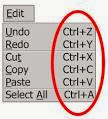
Facebook Shortcut Keys   For Facebook Help Center - Shift+Alt+0 www.youtube.com/user/thehackgang For Facebook Home Page - Shift+Alt+1 For Your Facebook Profile Page - Shift+Alt+2 For Friend Request - Shift+Alt+3 For Messages - Shift+Alt+4 For Notification - Shift+Alt+5 For Account Settings - Shift+Alt+6 For Privacy Settings - Shift+Alt+7 For Facebook Pages - Shift+Alt+8 For Facebook Terms of Use - Shift+Alt+9 For enable Search - Shift+Alt+? For Compose a New message - Shift+Alt+m   Keyboard Shortcuts Keys    Ctrl + A      Select all (including text, graphics). Ctrl + B      Bold. Ctrl + I      Italic. Ctrl + U      Underline. Ctrl + C       y. Ctrl + V      Paste. Ctrl + X      Cut. Ctrl + F      Find. 12px; line-height: 18px;">Ctrl + Z      Undo. Ctrl + K      Insert link. Ctrl + L    ...

LATEST FEATURE IN FACEBOOK - "CREATE POST" BUTTON ON FAN PAGES

Image
Facebook has added a small but useful feature in the fan pages, called as "Create Post" button. If you have created a fan page in your account, then being an administrator, you need to add new and fresh posts or content to your fan page. The "Create Post" button which is seen at the top of the fan page besides other buttons like Edit page, Insights, Hide Page, etc, is basically added for directing the admin person to go directly to the Status box, where you can add the content or post. Earlier you have added posts to your fan page without this button but now due to this latest feature by Facebook in 2014, one can directly start posting in the text box as the cursor is already placed inside the box and blinking for the user to type.